In this article, you will learn how to correctly store child benefits (family allowances) in the employee master data and what you need to consider for monthly payroll.
1. Prerequisites
Before entering the allowances in the payroll module, please ensure that:
2. Entry in the Employee Master Data
To record child benefits, proceed as follows:
- Navigate to Employees and select the relevant person.
- Click on the Children tab.
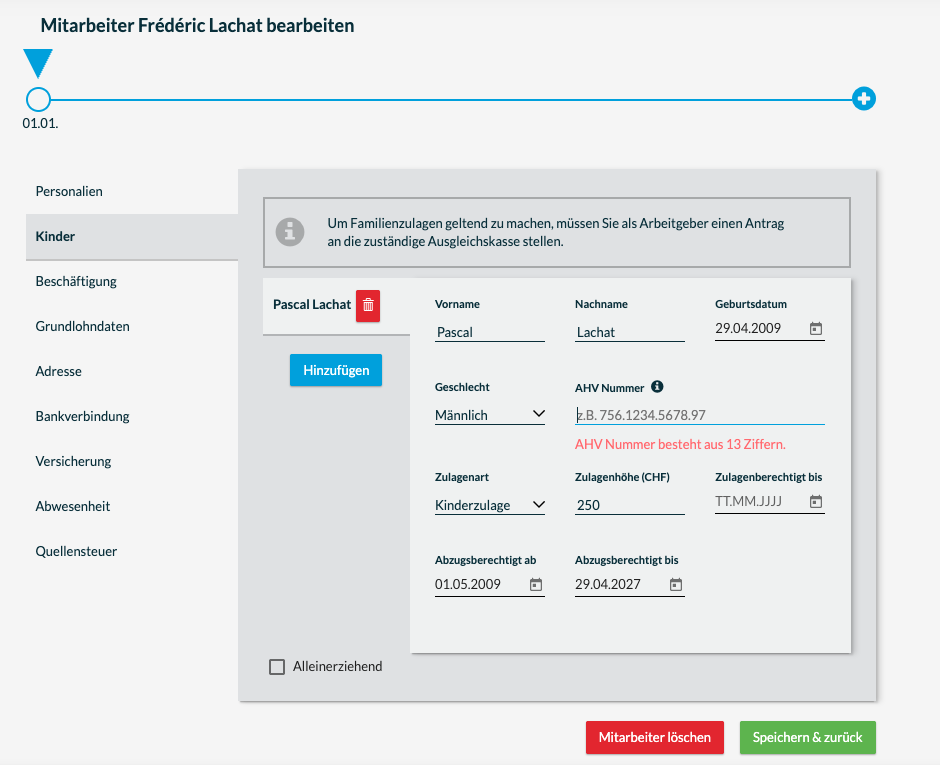
- Enter the child's name, date of birth, and gender. The AHV number is not mandatory.
- Select the Allowance type (e.g., child allowance, education allowance).
- Enter the monthly amount according to the FAK decision.
- Save the information.
Important: The validity date is automatically inserted for child allowances. The allowance is recorded directly in the month following birth until the child's 18th birthday. No start and end date can be entered for education allowances.
3. Automatic Payroll Processing
Once the allowance is stored in the employee master data, it will automatically appear on the paystub in every new payroll run.
-
Tax liability: Child allowances are subject to withholding tax but are exempt from social security contributions (no deductions for AHV/IV/EO/ALV). bexio automatically applies this logic.
-
Part-time employment: In most cantons, child allowances are no longer reduced for part-time employees (full allowance from a certain minimum wage). Please check with your equalization fund if in doubt.
4. Frequently Asked Questions (FAQ)
What do I do in case of an entry or exit during the month?
in bexio, there is no automatic pro-rata calculation of child allowances. This has a legal background, as the regulations vary depending on the canton and cantonal compensation office (FAK).
The child is in professional education – how do I switch to education allowance?
As soon as the entitlement to child allowance ends and an education allowance begins, please change the allowance type to education allowance and manually adjust the amount.
Where can I see the summary for the FAK statement?
Under the menu item Documents > Annual Reports, you will find the FAK statement. This shows you the sum of all paid allowances that you can settle with the FAK.
5. Legal Notice
Please note that bexio provides the technical framework for payroll. The employer is responsible for checking whether a legal entitlement to child allowances exists. For expert questions regarding eligibility, please contact your cantonal compensation office or your trustee directly.
6. Child Benefits (Geneva)
Special feature Canton Geneva: Child benefits with direct payment
In the canton of Geneva, child benefits are usually paid directly by the cantonal compensation office (OCAS) to the employee, instead of flowing through the employer. Nevertheless, these amounts must appear on the paystub.
Why do the allowances have to be on the paystub? Although you, as the employer, do not pay out the money, child benefits are subject to withholding tax. For the withholding tax deduction to be calculated legally on the entire income, the amount must be recorded in the payroll system.
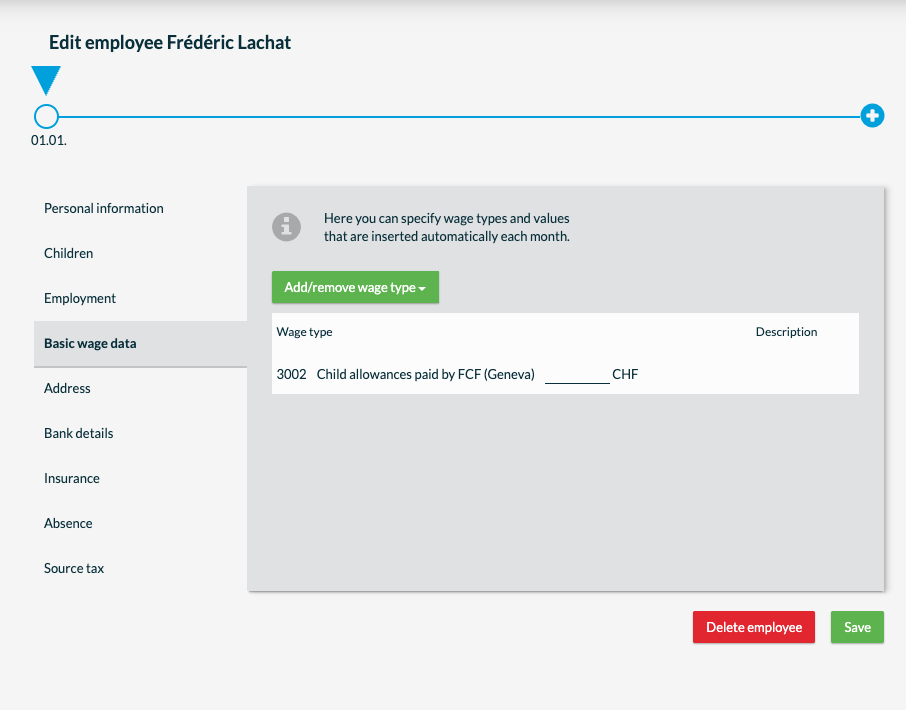
In this case, child benefits are not recorded under "Children", but rather payroll type 3002 child benefits paid by FAK (Geneva) is added to the employee under "Basic Wage Data". The monthly amount is also entered here. In this case, the child benefit amount merely serves as the basis for the withholding tax calculation. Although the allowance is listed on the paystub so that it can be correctly taxed, it is not added to the payout amount, as the payment is already made directly by the cantonal compensation office.
7. Voluntary Child Benefits
In addition to the legally required family allowances, some employers pay voluntary child benefits. In bexio payroll, two different payroll types are available for this purpose. The choice of the correct payroll type depends on whether the amount is subject to social security contributions or not.
1. Voluntary Child Benefits (AHV-liable)
Voluntary employer allowances are generally considered relevant wages. This means they are treated like normal wages.
-
-
Social deductions: All social insurance contributions (AHV, IV, EO, ALV, NBU, and KTG) are deducted from this amount.
-
Taxes: The amount is fully subject to withholding tax.
-
Application: Select this payroll type if you provide your employees with a bonus or allowance that exceeds the cantonal minimum and is legally considered part of the wage.
2. Voluntary Child Benefits (AHV-exempt)
There are specific constellations (depending on regulations or cantonal guidelines) where voluntary allowances are exempt from social security contributions, as long as they have a specific character.
-
-
Social deductions: No deductions for AHV, IV, EO, ALV etc. are made.
-
Taxes: However, the amount remains subject to withholding tax.
-
Application: This payroll type is used if the allowance is explicitly classified as "not subject to contributions" according to the guidelines of your equalization fund.
For this purpose, payroll type 3005 or 3006 voluntary child benefits is added to the employee under "Basic Salary Data". The monthly amount is also entered here.