Correct accounts in bills after booking
Here you can learn how to use the "Change posting account" function to update account assignments directly in already approved supplier invoices without resetting their status.
If you want to change the posting account for a supplier invoice whose status is not "Draft" or "Open", you can do this using the "Change posting account" action without having to change the status.

Via the account selection window, you can select and save a new accounting account for each individual item. All accounts that are available for a supplier invoice can also be selected as a new accounting account.
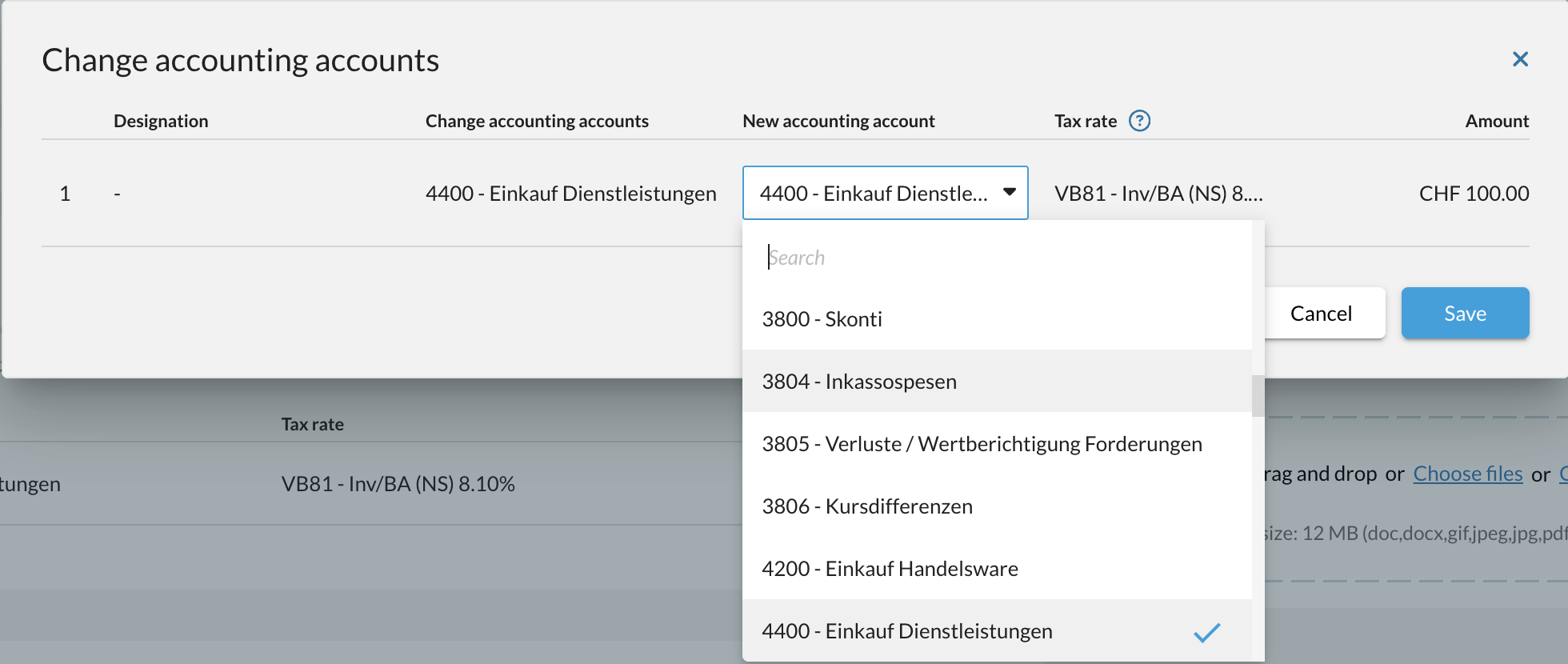
After saving, the new posting accounts are displayed on the bill and in the accounting.
This process can be repeated for the same bill if necessary.
If you want to change the posting account for a bill with the status "Open", simply set it back to "Draft".
Please note: There are some restrictions under which this function is not available.
- It is not possible to change the accounting accounts of a multi-line bill that contains the same accounting account and the same tax rate.
- The bill must be set back to draft status even if you want to update the tax rate.
- It is not possible to change accounting accounts for a bill that has been posted in a closed VAT period and in a closed financial year.