Background Info
The transfer of Credit Suisse clients to UBS will begin in March 2025. Further waves will take place until the first quarter of 2026.
What does this mean in practice for Credit Suisse customers who work with bexio?
The Credit Suisse IBANs will not be transfer to the UBS account of a Credit Suisse customer. The transfer means that Credit Suisse customers will receive a new UBS bank account with new IBAN (as if the customer decided to leave Credit Suisse and onboard with UBS as a new customer). UBS are introducing automation measures for redirects of payments for a transitional period to help smoothen the transfer experience for Credit Suisse customers.
Transfer of banking relationships from Credit Suisse to UBS
The transfer of banking relationships also has an impact on external systems, such as your accounting software.
Bexio is committed to making this transition as smooth as possible for you and is in direct contact with UBS.
When will your banking relationship be transferred?
Due to the general complexity and in order to make the process as convenient as possible for you, UBS has decided to bundle banking relationships and transfer them at different times. You will be informed in good time by UBS by post as soon as your banking relationship is transferred. From then on, you will find details of the procedure and the process of your transfer on this page.
What do I have to do in bexio?
Banking
As soon as you have received your new UBS IBAN:
- Create a new bank account in bexio. Select the option "Create new accounting account and link to bank account".
- The IBAN must not be adjusted for the existing Credit Suisse account. You can adjust the "internal name".
Account transactions on the existing Credit Suisse account must continue to be posted as usual. Use the banking reconciliation as before or create manual posting entries.
Important:
Once you have access to your new UBS account, you can follow these steps.
You should not take these steps if you do not yet have access to your UBS account.
Once you have access to your UBS account, you can connect your UBS account to bexio. Find out how to do this here: How do I activate the bank «UBS» bLink?
Sale
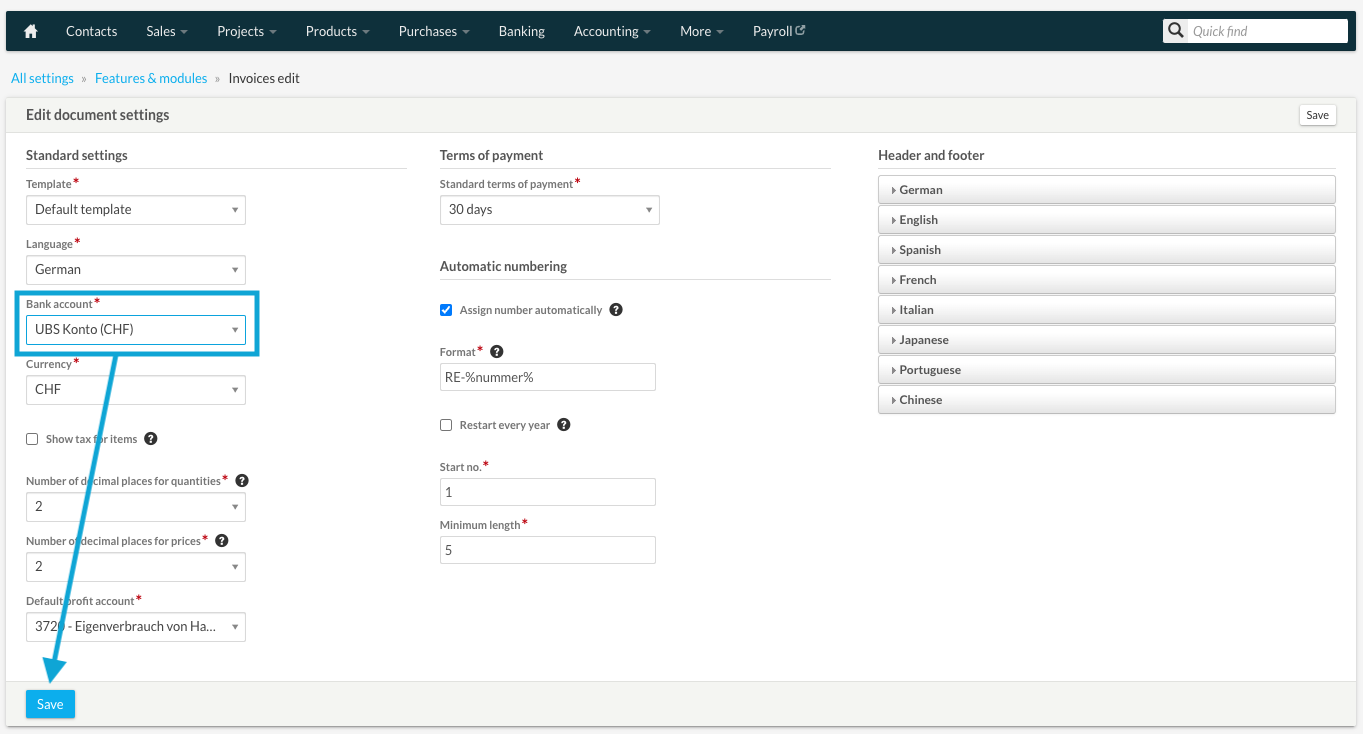
- Customize the default bank account for incoming payments at https://office.bexio.com/index.php/kb_settings/edit/id/3 "Settings" - "All settings" - "Functions & modules" - "edit invoices"
- Go through invoices that have not yet been sent and change the bank account to the new UBS account under "Settings" on the invoice.
Purchasing - Supplier invoice
- Customize the default bank account for outgoing payments at https://office.bexio.com/index.php/kb_settings/edit/id/11
- "All settings" - "Functions & modules" - "edit invoices"
- Go through supplier invoices that have not yet been paid, delete the existing payment if necessary and enter a new payment with the UBS account as the "debit account".
- Please note: To avoid double payments, the payment amounts already transmitted must be canceled manually in Credit Suisse e-banking!
- Attention: Payments on the Credit Suisse account with an execution date after the opening of the UBS account should not be executed. To be on the safe side, you should check the payments manually and cancel them if necessary if you have entered the payments in the UBS account.
Purchasing - Expenses
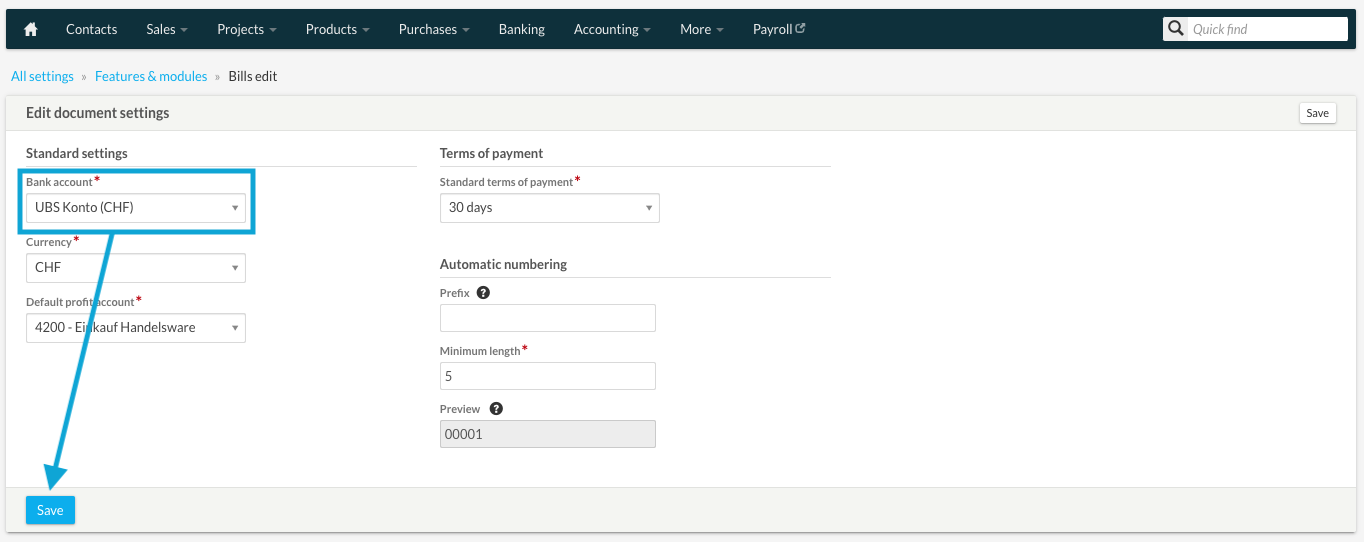
- Customize the default bank account for expenses at https://office.bexio.com/index.php/kb_settings/edit/id/12
- "Settings" - "All settings" - "Functions & modules" - "Edit outputs"
Payroll
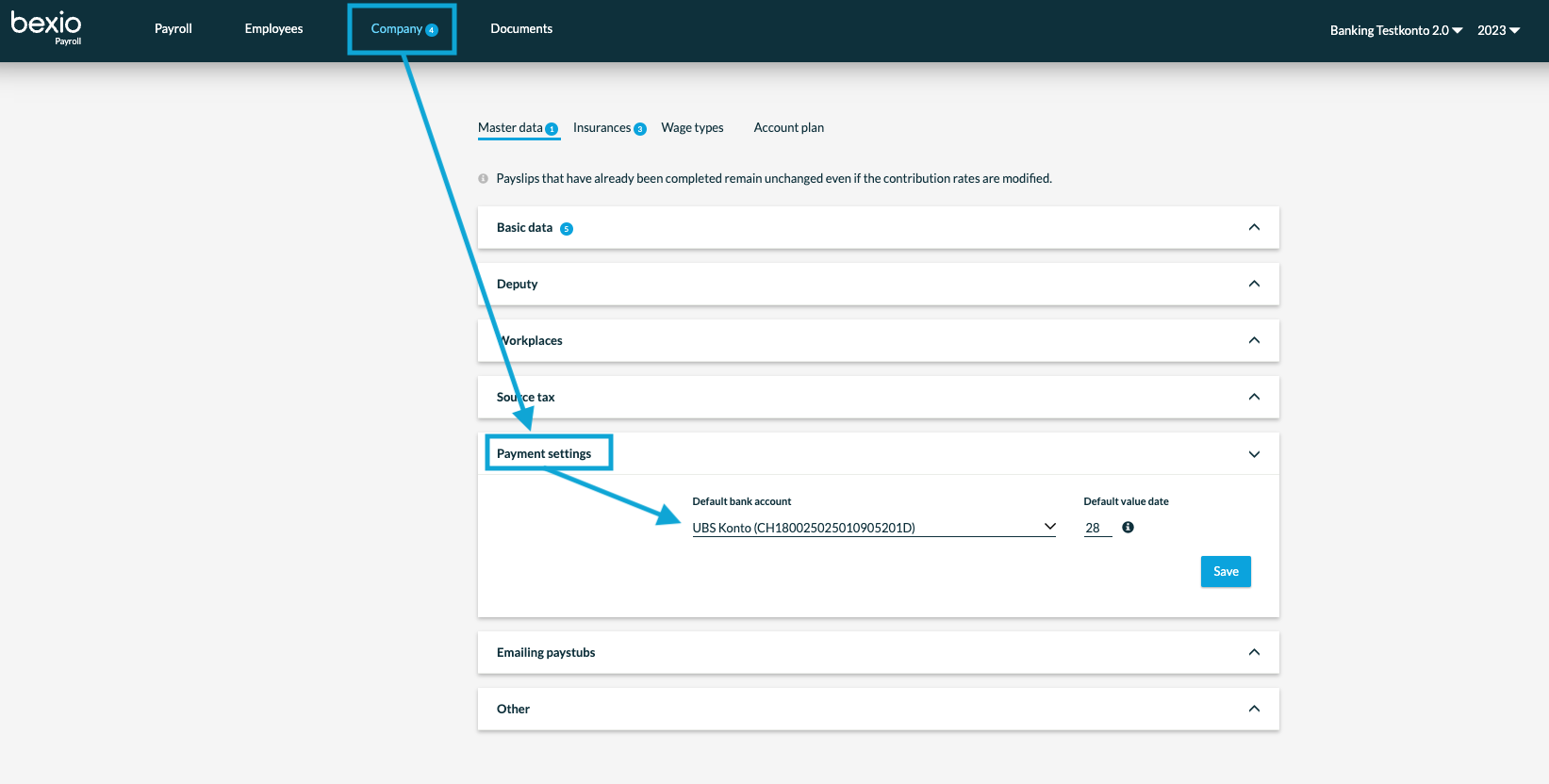
- Customize the default bank account for outgoing payments under
- "Company" - "Master data" - "Payment settings" - "Default bank account"
- For future payouts, check that the new account has been deposited.
Historie
Balancing entry
We do not receive closing entries or opening entries from banks (transactions). This means that you must balance the Credit Suisse account (bring it to 0) and open the UBS account (transfer the opening balance). You can do this by making a manual entry. You can find the manual entry under "Accounting" - "Manual entry." If you need assistance with the entry, please contact your fiduciary.
FAQ Banking Contracts
Q: I already have an existing UBS contract and my Credit Suisse contract is about to be transferred. How am I affected by the transfer?
A: The transfer will result in your company having two UBS contract numbers. bexio only supports a single direct e-banking connection per bank for each company. To learn more about what to do in this situation, please visit our dedicated help center article: Special transfer between Credit Suisse and UBS
Q: I have separate bexio accounts for each of my companies in order to clearly reflect the company structure. Is there anything special I need to bear in mind?
A: Yes, please note that with bexio, only one UBS contract number per company can be connected via the bLink interface. We therefore recommend that two people, each with their own UBS Digital Banking contract and the necessary access permissions, carry out the registration.
Example: Hans Müller connects the accounts of Company A in Company A's bexio account with his digital banking contract. For Company B, Fritz Meier takes over the connection with his own digital banking contract in Company B's bexio account.