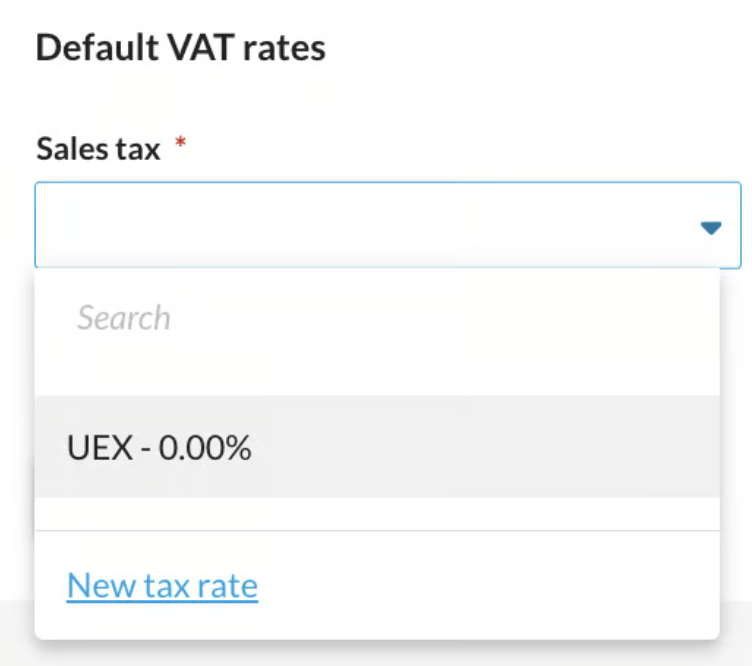
To create a missing VAT rate in bexio, customers must navigate to "Settings" - "Accounting" - "Tax Rates" and click on "New Tax Rate." It is advisable to first check if a rate already exists and only needs to be reactivated. In the input form, the new rate must first be marked as "Active" and a "Valid from" date must be set, which can be retroactive if necessary. Then, a unique, "descriptive" code, the appropriate tax type, and the actual tax rate in percent (%) must be entered. For correct reporting, the form assignment (digit) is essential, as it determines where the bookings appear on the official Swiss VAT form. If you are unsure, consult your Fiduciary. If the tax type "Net tax rate" is selected, the rate specified by the FTA must also be entered in the "Net tax rate (in %)" field.
Content
How do I create a VAT rate?
bexio automatically creates VAT rates for you when setting up your bexio account based on your VAT settings. If you are missing a VAT rate when creating an invoice or other document, you can create it yourself.
To create your own tax rates, go to "Settings" - "All Settings" - "Accounting" - "Tax Rates".
You are now on the overview of all existing VAT rates in bexio. Here you can create a new VAT rate by clicking the "New Tax Rate" button.
Tip: Before creating a new VAT rate, please check if bexio has already created it for you, but it is not active. This may save you from having to enter the VAT rate, as you can simply activate the existing rate.
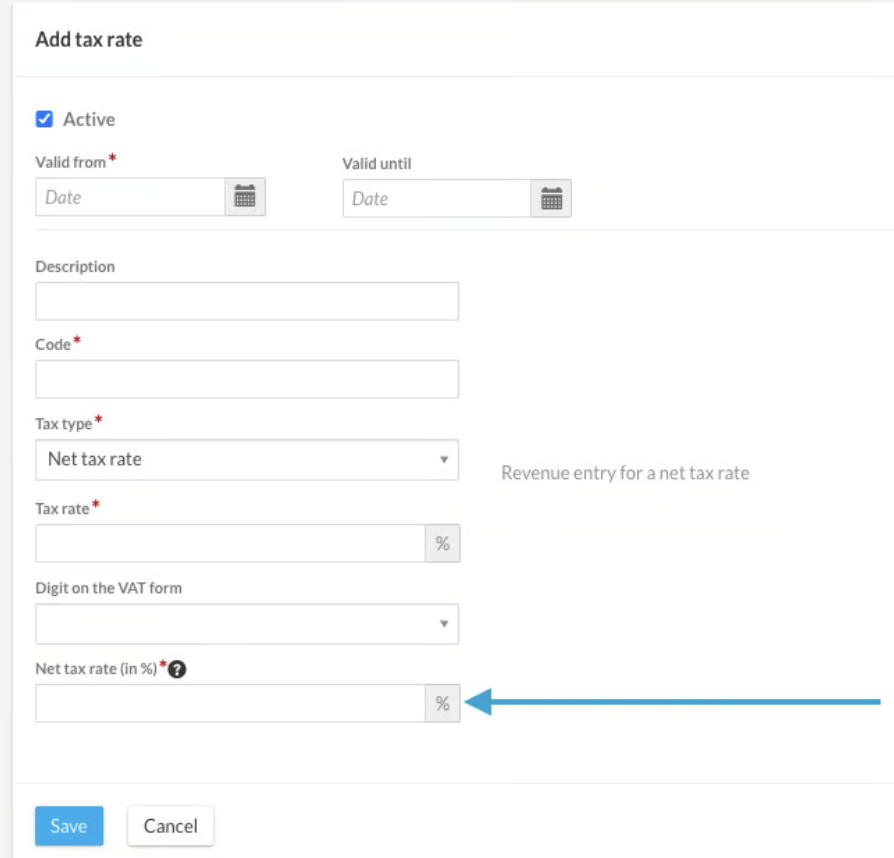
You are now in the input mask for new tax rates. Fill in the form fields from top to bottom so that bexio can make appropriate suggestions for you.
1. Active
By default, all newly created VAT rates are created as active. Only when a tax rate is active can you select and use it in invoices and other documents.
2. Validity
The "Valid from" date is mandatory for every newly created VAT rate. Specify here from when you want to use the VAT rate.
An example:
You create a new tax rate on 30.1.2026, but you still want to use it for retrospectively recording invoices in 2025. In this case, you enter January 2025 in the "Valid from" field, so that the new tax rates are valid from January 2025.
When you enter the VAT rate, in most cases you do not yet know until when your VAT rate is valid. For this reason, "Valid until" is not mandatory. We recommend that you do not enter anything here until it is known from when the VAT rate is no longer valid.
3. Code
You can determine the code of your VAT rate yourself.
Important: You and your employees will know which VAT rate it is as soon as they see the code in a selection field on invoices and other documents.
There are various approaches to setting these codes. We at bexio use descriptive codes for our automatically generated VAT rates. This means that the percentage of the VAT rate and its type are visible in each code.
4. Type
Select the tax type that matches the VAT rate you want to create. Explanations for all types can be found in the article Tax Types.
5. Tax Rate
Enter the tax rate in %. In the case of a flat rate tax, enter the tax rate that should be visible to your customer on an invoice.
6. Form Assignment (Digit)
Here you indicate where your bookings should appear on the official Swiss VAT form for this VAT rate. Next to each field in the VAT form there is a number; this is exactly what you need to enter here. If you are unsure where on your VAT form the bookings for your VAT rate should appear, ask your Fiduciary or VAT expert.
Net tax rate
If you create a VAT rate of type "Net tax rate" or "Opted-in net tax rate", an additional field "Flat rate tax (in %)" appears at the bottom of the form. Here you enter the flat rate tax specified by the FTA and applicable to you. For a net tax rate that is valid from 01.01.2026, you can set a "Valid from" date from January 2026. From this date, the field for this net tax rate will also be visible on the VAT form and the valid numbers for it will automatically be available for selection.
Automatically created net taxe rates
By default, bexio creates the net tax rates for you that you specified during onboarding. bexio now automatically creates the new net tax rates for you with each sales tax rate, so you can use your current net tax rates from the start.
Creating a net tax rate before changing the tax method
If you are effectively taxed, it is not possible to enter a net tax rate, as it does not appear in the "Tax Type" list. To select a net tax rate, you must first change the method in the "Base VAT Settings". There you can specify and save the "Standard VAT Rates" as the last setting option.
If you switch from effective taxation to net-rate taxation and have not previously created a net tax rate, you can easily add the net tax rate without leaving the settings. Click on "New Tax Rate" for sales tax. Then you can select the corresponding code from the numbers and the required tax rates will be created for you. Alternatively, you also have the option to create the tax rates manually. To do this, click on "Create tax rate manually".
Note: When changing the method, all newly created flat rates are recorded under number 323.