If your fiscal year differs from the calendar year, you can set this in bexio. The standard fiscal year matches the calendar year. Furthermore, it is possible to show an extended fiscal year in bexio.
Generally we recommend that you change these settings and make the adjustments together with your accountant, to ensure that your bookkeeping is complete and correct.
Fiscal year settings
Under "Settings" - "All Settings" - "Accounting" - "Change fiscal year" you have the option of defining your fiscal years. The fiscal years define the time periods for your financial bookkeeping.
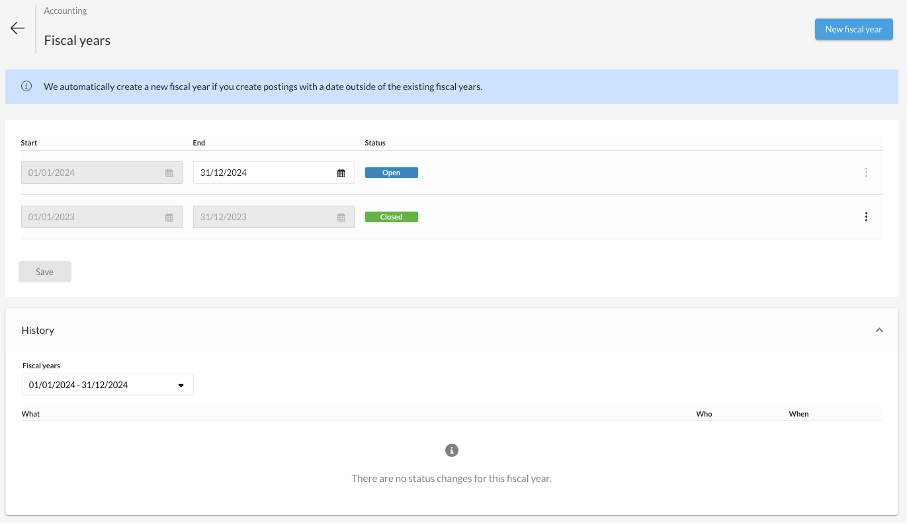
A fiscal year usually starts on January 1 of any given year and ends 12 months later on December 31.
If your fiscal years do not correspond to the calendar years, you have the following flexible setting options:
Mid-year fiscal years differing from calendar years
(e.g., from July 2023 - June 2024)
Depending on the sector, it may make sense to use a "fiscal year that differs" from the calendar year in order to be able to better record and compare seasonal developments in the books.
Short and extended fiscal years
You can set either a shortened or an extended financial year in bexio. The duration can be set between 2 and 24 months.
What do I need to take into account / consider?
- A fiscal year always starts on the first day of the first month and ends on the last day of the last month.
- bexio creates new fiscal years automatically as soon as an entry is made in an accounting period that does not exist yet.
- A new fiscal year must follow the previous fiscal year without gaps. Gaps between accounting periods are not permitted.
- Order processing (quotes, orders, invoices, etc.) will still be shown based on the calendar year. However, you can choose another period using the detail filter and save this filter.
- The VAT reporting does not affect the differing fiscal years regardless of the method. It will continue to be done quarterly or half-yearly and therefore shown that way in bexio.