In bexio, you have the option to reset or delete the partial invoicing function on a sales order, subject to certain conditions.
Content:
- Prerequisites for deletion
- How to delete the partial invoice function
- What to do if an invoice has already been created?
Prerequisites for deletion
You can only delete the “Partial invoices” function from a sales order if:
- No partial invoice has been created yet from this order.
- The sales order has the status is “Pending".
How to delete the partial invoice function
If the above conditions are met, follow these steps:
- Open the relevant sales order.
- On the right side, scroll down to the “Partial invoices” section.
- Click the “Remove partial invoices” button.
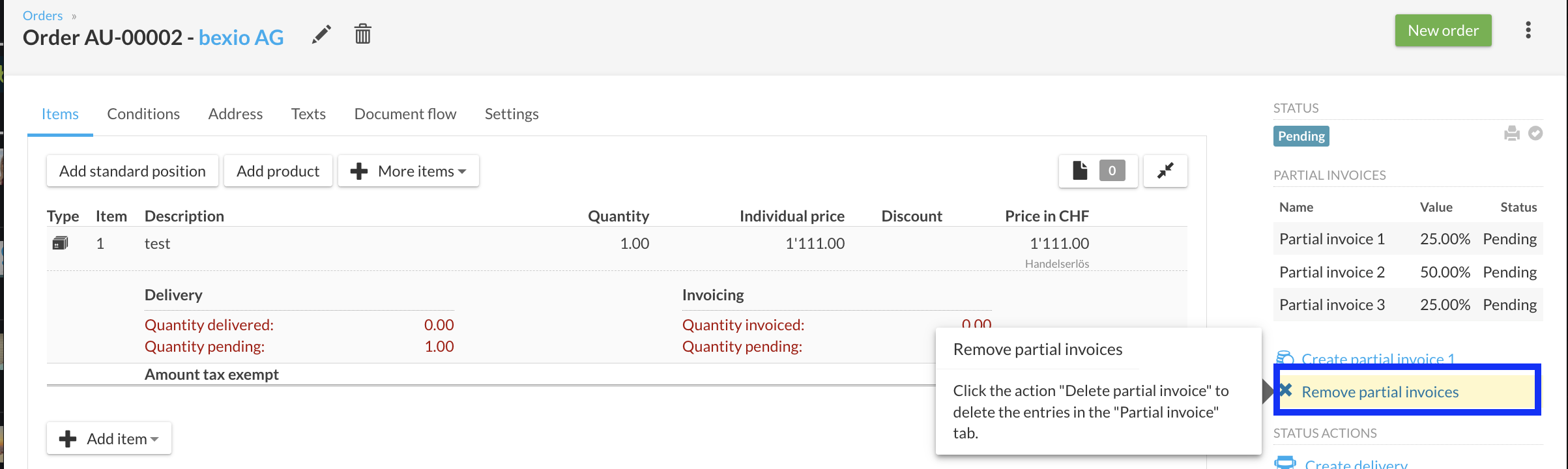
If this button is not visible, check that your order status is indeed “Pending” and that no invoice has been generated yet.
What to do if an invoice has already been created?
If the button is no longer clickable, you must follow these steps:
- Go to the relevant invoice and cancel it.
- Return to the sales order to cancel the order.
- Create a new sales order from scratch.