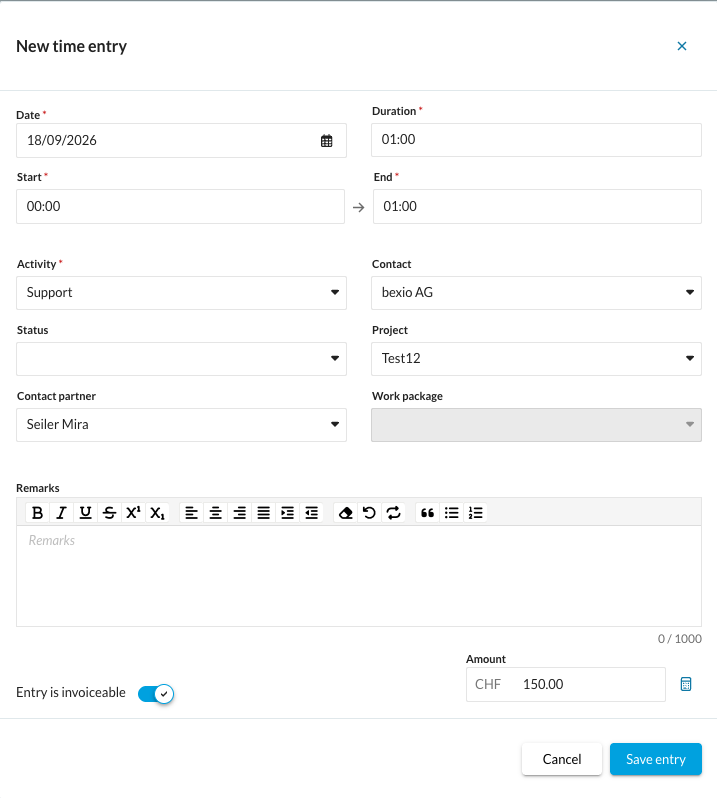
Using the calculator symbol in the Amount field, the billing amount can be automatically calculated based on the recorded time and the hourly rate stored for the customer, project, employee or activity.
Using the calculator symbol at the bottom right of the Amount field, you can have the billing amount for your time recording calculated automatically.
Note: This is only possible if the corresponding entry is marked as invoiceable.
This is how it works:
1. Enter hourly rate: Prerequisite: Ensure that an hourly rate is stored in the system for the project, customer, employee or activity.
2. Record times: Enter the duration or the start and end time (from/to) of the service. Alternatively, this function can also be used directly in the timer. Ensure that the entry is marked as invoiceable.
3. Perform recalculation: Click the calculator symbol at the bottom right next to the amount field. The total amount will now be automatically calculated and entered based on the recorded time and the assigned hourly rate.
How to check the result: The amount in the Amount field updates immediately after clicking.