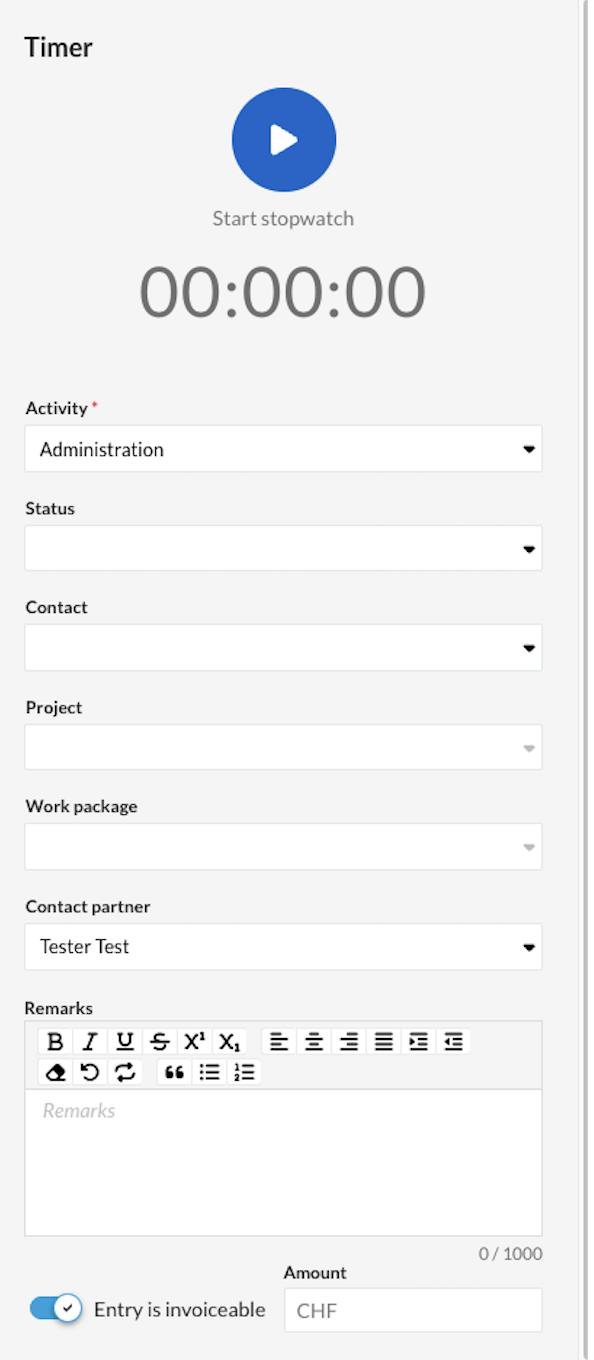
The timer enables precise, direct time tracking and the assignment of working hours to projects and mandatory tasks. In addition, optional details such as clients or notes can be added, and billability can be set manually or automatically.
With the timer, you record working hours directly as they are performed. This allows you to record your times precisely and assign them immediately to suitable projects or activities.
Start and stop time recording
- Start: Click the blue play button (Start stopwatch).
- Select activity: Select the corresponding activity (Mandatory field).
- Stop: Click the button again (Stop stopwatch). The time is saved automatically.
Note: There is no pause function; each time is saved as a single entry.
- Reset fields: Your entries remain after stopping. You can restart the stopwatch directly or reset the mask beforehand using the "Clear all fields" button.
Important: The Activity field is mandatory. Without a selected activity, the time entry cannot be stopped or saved.
Optional information
For a more detailed recording, you can add the following fields:
- Status: Set the current processing status.
- Contact: Select the associated customer or partner.
- Project & Work Package: Assign the time directly to an existing project and work package.
- Contact person: Store the responsible contact person.
- Comments: Add additional notes or details about the service rendered.
Invoiceable
The option Entry is invoiceable controls whether the recorded time can be invoiced to the customer:
- Automatically: The switch activates itself as soon as you select an activity that is stored as invoiceable in the master data.
- Manually: You can adjust the setting at any time using the toggle switch at the bottom of the mask.