This article will guide you through how to export the contacts the details of how to read and find the contact and address data efficiently. The data consists of various columns that provide essential information about contacts, their addresses, and how to distinguish between main and additional addresses for invoicing purposes.
Content
1. How to export the contact list with all addresses
2. Which information are exported
2.1 Address Information
2.2 How the invoicing address is determined
2.3 Address Details (Specific Fields)
2.4. Contact Information Overview
2.5. Contact Information for Communication
2.6. Additional Notes
1. How to export the contact list wit all addresses
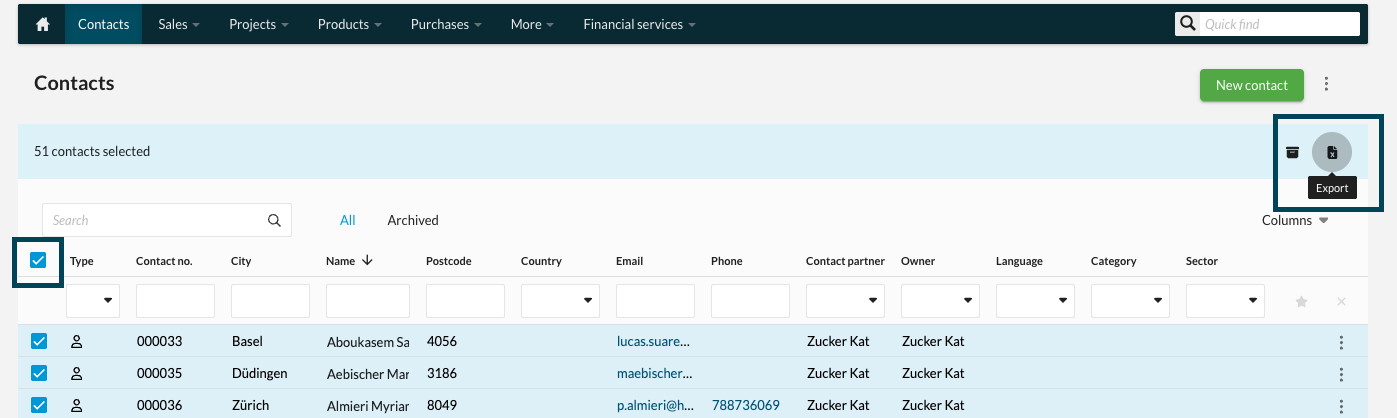
- Go to the Contacts menu from the top navigation bar.
- To export all contacts in excel, click the checkbox at the top of the list.
To ensure that all addresses, including additional ones, are included in your export, select:
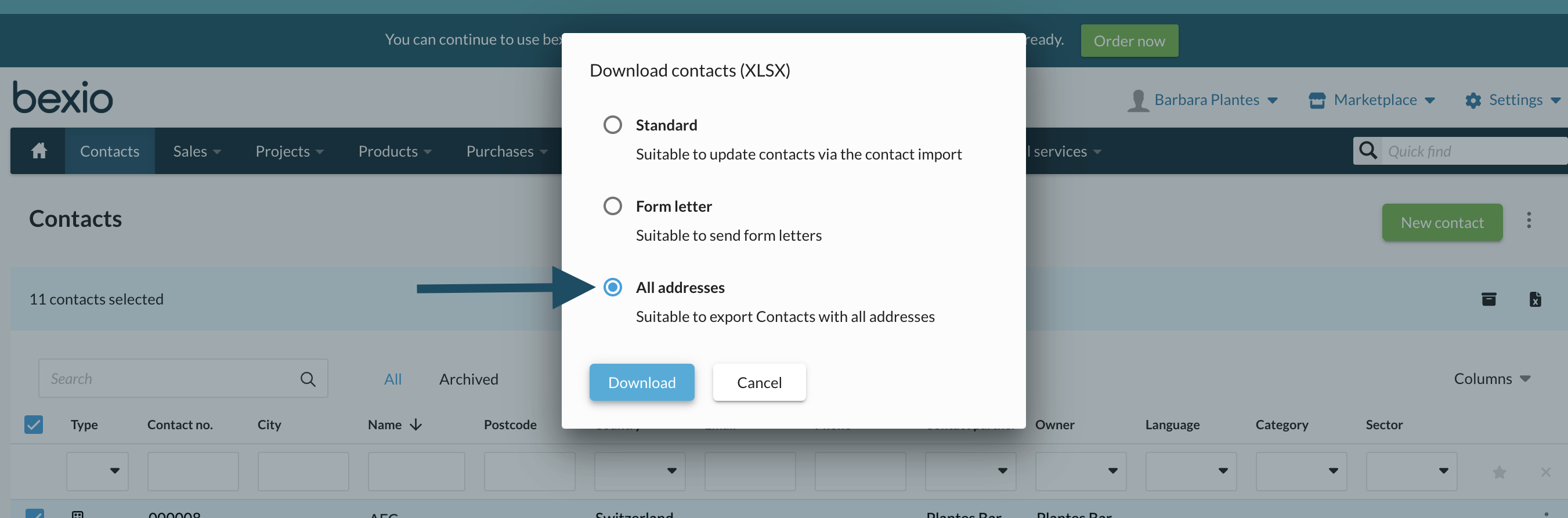
Do not use the "All address" export for the contact import.
2. Which information are exported
2.1 Address Information
Each contact can have one main address and one or more additional addresses. The following columns help you understand how each address is classified and which one should be used for invoicing.
Main Address
This column indicates whether the address is the primary address of the contact.
Invoicing Address
This column specifies whether the address should be used for invoicing.

2.2 How the invoicing address is determined
The system automatically determines the invoicing address based on the following logic:
If an additional address = 0 is specifically designated as the billing address = 1, it will be used as the invoicing address.
If no additional address is marked for invoicing, the main address = 1 will be automatically selected as the default invoicing address.
2.3 Address Details (Specific Fields)
For each address, the following specific information is tracked:
- Street: The street name for the address.
- Building Number: The specific number or identifier for the building.
- Post Code: The postal code associated with the address.
- City/Town: The city or town associated with the address.
- Country: The country in which the contact is located.
2.4. Contact Information Overview
Each row of the data represents an individual or a company contact, with several key pieces of information to help you organize and classify them. Below are the main fields:
- First Name: The first name of the contact person.
- Last Name: The last name of the contact person.
- Company: The name of the company the contact is affiliated with.
- Additional Company Name: If applicable, the secondary company or division name associated with the contact.
- Contact no. of linked company: If a private contact is linked to a company, the contact number for the linked company will appear in this column. For example: if Contact 5 is associated, and private contact 4 is linked to this company, the contact number will be displayed under Contact 4 in this column.
- Recipient Name: The person or company to which the correspondence or package is addressed.
- Additional Name (Additional address only): Any additional names tied to the contact, such as departments or other individuals.
2.5. Contact Information for Communication
This section includes various ways of reaching the contact:
- Email / Email 2: Email addresses for the contact. If there are multiple addresses, they will appear in these fields.
- Phone: The main phone number for the contact.
- Phone 2: A secondary phone number.
- Mobile: The mobile phone number for the contact.
- Language: The language preference for communication with the contact.
2.6. Additional Notes
These fields allow you to personalise and enhance the contact record beyond basic information, which is essential for effective relationship management, whether personal or professional.
- Sector: The sector to which the contact belongs (e.g., finance, healthcare, etc.).
- Notes: Additional notes or comments regarding the contact. This could include specific instructions, preferences, or other relevant information.
- Correspondence type : The preferred method of contact, such as email, phone, or mail.
- Contact partner: The individual or department responsible for communication with this contact.
By organising and utilising this data, you can improve your ability to communicate effectively with contacts, manage invoicing processes, and ensure that your records are up to date. Remember to check the main address and invoicing address carefully to avoid sending invoices to incorrect locations.