In this article you will learn how to create non-bexio clients in Cockpit and what benefits this new feature has.
Content
Why was this feature implemented?
This feature has been implemented so that you as a fiduciary can man manage more than just your bexio clients in the Cockpit. You now can also manage private persons and coroprate clients from other softwares and create processes for them. In addition, this feature ensures that your contacts between bexio and the cockpit are always synchronized. You can create non-bexio clients directly in the bexio Cockpit or in the contact module of your bexio account.
Note: Key figures for non-bexio clients are not available in the Cockpit.
How can I create the non-bexio clients in the bexio Cockpit?
The prerequisite to be able to add a non-bexio client in Cockpit is an existing link between your bexio account and the Cockpit. In the following article you will find the instructions on how to set up this connection: Connect you bexio account with your bexio Cockpit.
In order to create a non-bexio client, you can go to the client overview, click on "Add client" and select "Non-bexio account". After that you can set it up accordingly.
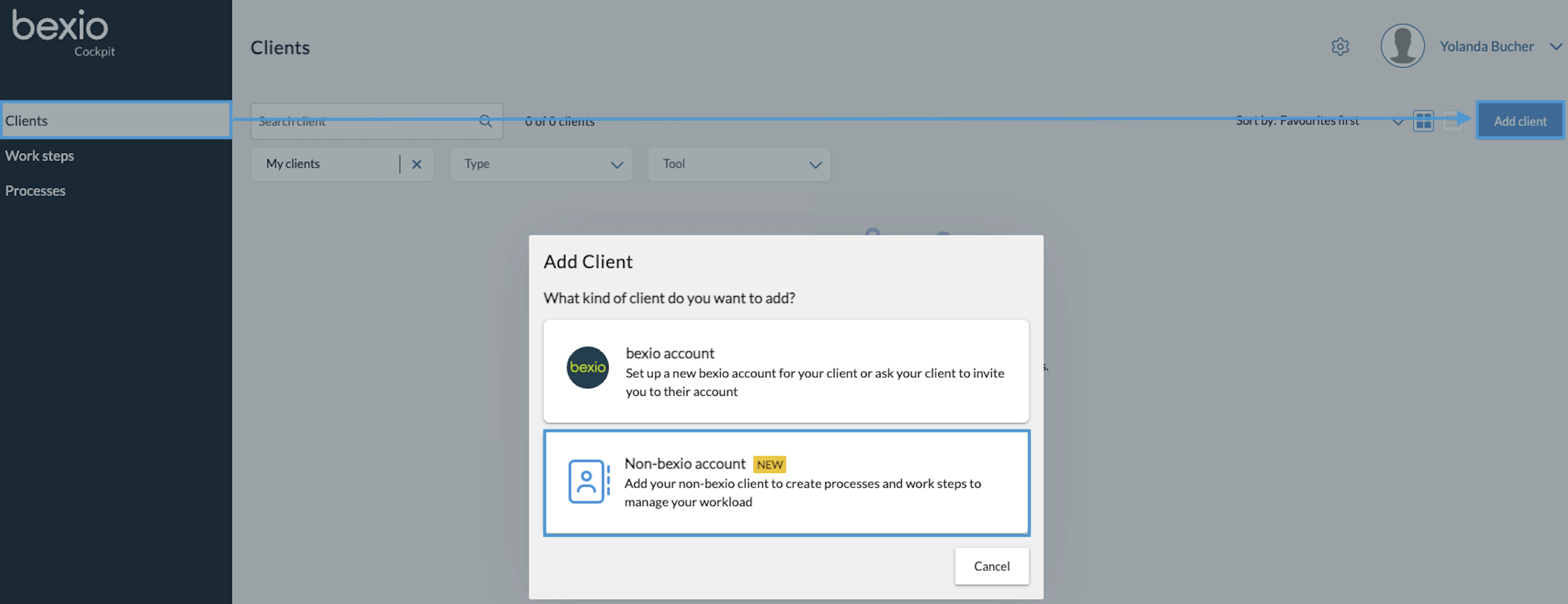
You can then select one of your existing contact from the contact module or create a new one. If you have not selected an existing contact, click on "Continue with new client".

Here you can create non-bexio clients as private persons or company contacts.
Once you have entered the data, click on "Done". You will then be taken to the client overview and the process has been completed. You can now start managing non-bexio clients and creating processes. If you have entered a link to the current software, you can open the corresponding website directly from the client overview. To do so, click on the following icon:
What do I have to consider regarding the deletion / archiving of the non-bexio clients?
You can remove non-bexio clients at any time in the same way as bexio clients by using the 3-dot-menu on the right-hand side of the client.
If you remove a non-bexio client in the Cockpit, it will still be available in the bexio account as a contact and the existing processes will still be available. The processes can be deleted manually.
If you archive a contact in the bexio account that is a non-bexio client, it will be removed from the Cockpit. The processes will also remain and can be deleted manually.