Every bexio package includes user licenses. Learn how to invite and manage additional users in your account here.
Content
bexio Packages and Users
This article explains which bexio packages are available and how many users are included as standard in each package.
- Basic Package: 1 User
- Advanced Package: 2 Users
- Optima Package: 5 Users
- Ultimate Package: 25 Users
If you have reached the maximum number of users in your package, you can upgrade your package at any time. Go to "Settings" - "Packages" - "Package and Options" and select your suitable package.
For more than 25 employees, contact: +41 71 552 00 67 or accountmanagement@bexio.com
Prerequisite
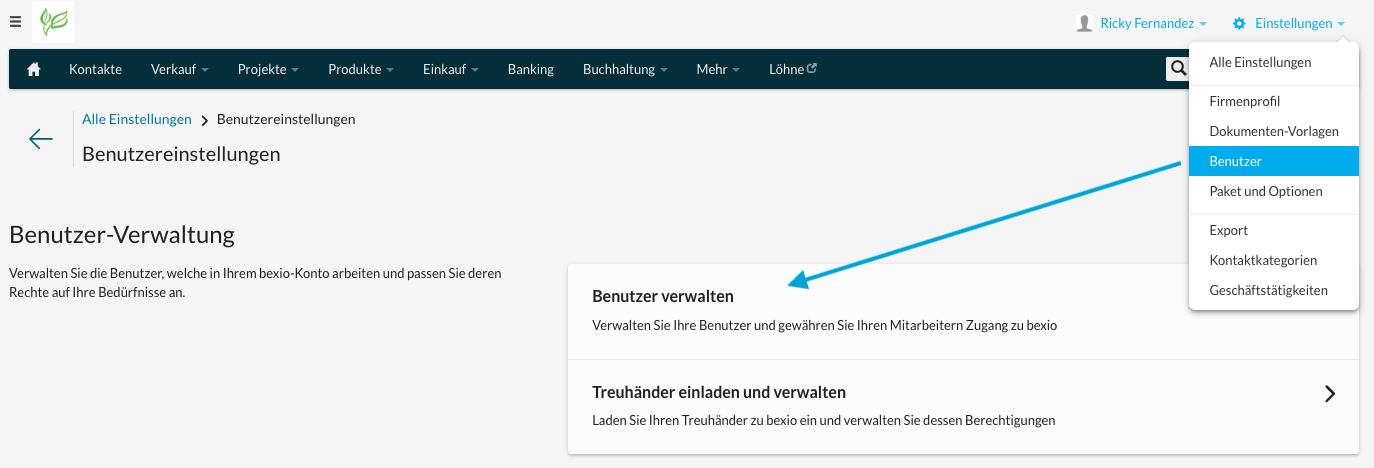
To add another bexio user, you must invite them directly in your bexio account. First, open the "Settings > Users" section and then click on "Manage Users".
Note: If the "Invite User" button is gray instead of green, you no longer have available user licenses in your current package.
Invite Users
Click on the green button "Invite User" in the top right corner. Enter the new user's email address. They will automatically receive an email with a link to set a password and complete personal details.
Superadmin Rights
You can determine whether a user should act as a Superadmin. This right overrides access to user management, allowing a Superadmin to increase their own rights at any time.
Good to know: A Superadmin does not have automatic access to all admin functions, but can enable them for themselves.