The bexio project overview allows you to centrally manage projects using flexible project tabs, quick entry features for budgets, tasks, and time, as well as easy management of the project team and all linked documents in the document workflow.
After you have entered the master data for a new project, you will go directly to the central Project Overview. From here, you control all aspects of your project – from team staffing and task assignment to billing in the document flow.
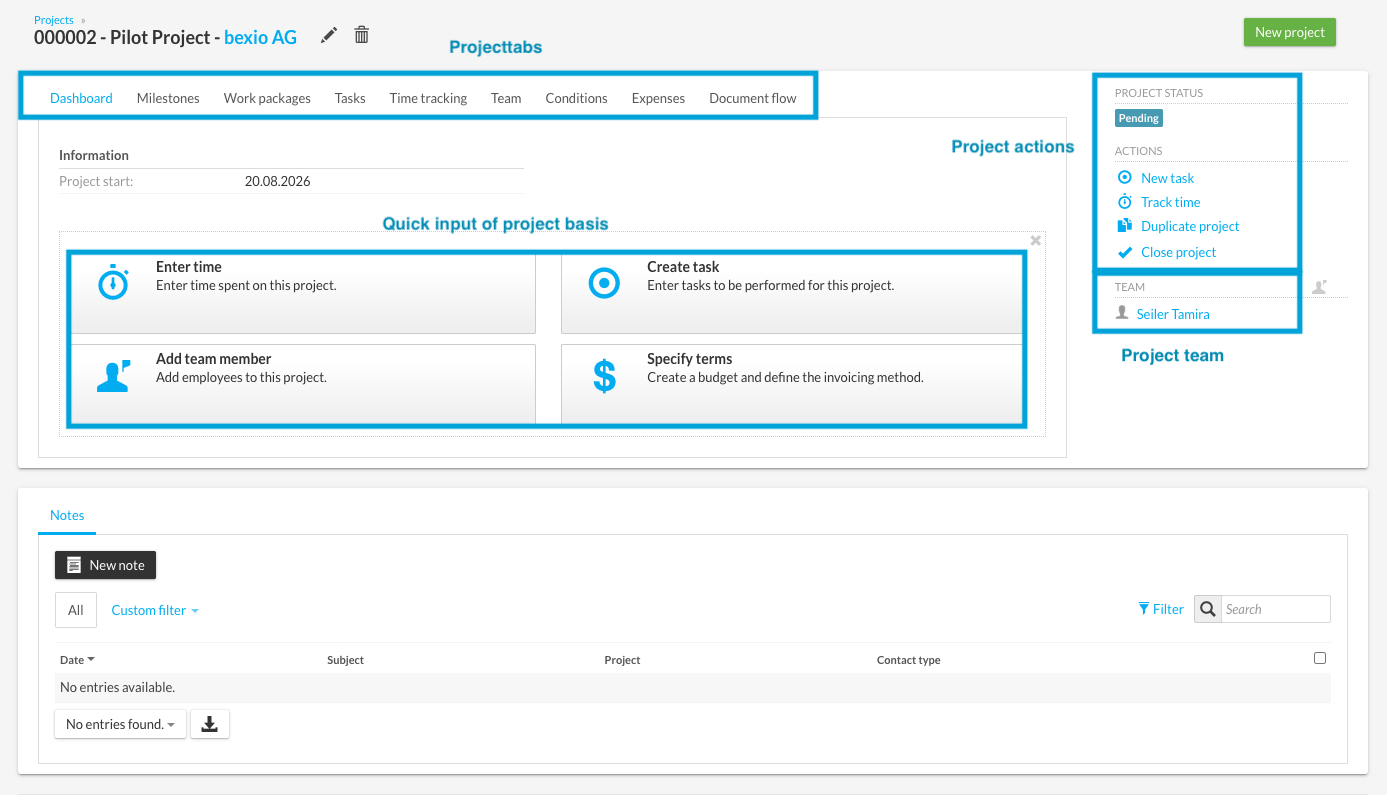
1. Quick Entry of Project Basics
Directly on the dashboard, you have a quick entry option for the most important basics of your project. Using four central buttons, you can quickly set the initial parameters:
-
Add Team Members: Directly assign the first team members.
-
Record Tasks: Organize the first pending items and work steps.
-
Record Times: Book incurred expenses directly to the project.
-
Define Conditions: Define project-related hourly rates and the total budget.
Tip: You can hide this overview at any time by clicking the "X" (top right). All settings can, of course, also be made later at the respective points in the project.
2. Overview of Project Tabs
You organize and structure your project centrally via the various project tabs:
-
Milestones & Work Packages: Define important interim goals and divide the project into clear phases.
-
Times & Tasks: Always maintain full control over recorded hours and open tasks.
-
Team: Manage project members and their assignments.
-
Document Flow: Here you will find all Quotes, orders, and invoices linked to this project.
3. Assign Project Team
To invite team members to the project and assign roles to them:
-
Switch to the "Team" tab (or use the corresponding button on the dashboard).
-
Select the desired bexio user.
-
Assign a specific function to the user.
-
The user is now successfully assigned to the project team.
4. Contextual Project Actions
Depending on which project tab you currently have open, different Project Actions are available on the right side:
-
On the Dashboard: Quick actions for recording entry and basic data.
-
In the "Document Flow" tab: Direct creation of linked Quotes, orders, and invoices.