In this article, you'll learn how to tailor the numbering system for your projects to best suit your needs. You can flexibly decide whether project numbers should be automatically generated, individually formatted, or reset annually.
Requirements
No special access rights are required for these adjustments
Step-by-Step Instructions
1. Go to Settings
Click Settings in your account.
Select All Settings, then Master Data.
Open the Projects: Document Settings section.
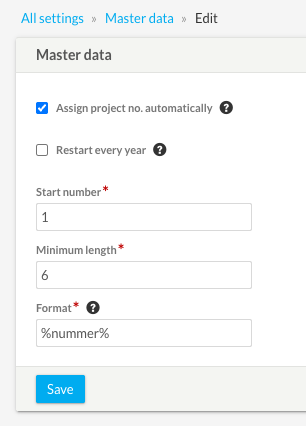
2. Customize Numbering and Formatting
Here, you have various options for customizing project numbers:
Automatically assign project numbers: Check this box to have the system automatically assign consecutive numbers. If you uncheck this box, you can enter the number manually each time you create a new project.
Starting Number & Minimum Length: Specify the digit from which the numbering should start and the minimum number of characters the number must contain.
Format & Placeholders: In the Format field, you can define the exact appearance of the number. Hover your mouse pointer over the question mark icon above the field to see an overview of all available placeholders.
Restart Annually: If you check this box, the new menu item “Number Ranges” will appear in the master data settings. Under this item, you can then define the annual starting number for each calendar year.
3. Save Changes
Click the Save button at the bottom of the page to apply your new settings.
FAQ & Troubleshooting
Why aren't my annual project numbers updated correctly for the new year?
If you use the “Restart Annually” feature, it is essential that the annual numbering be activated and calibrated before the end of the year. If this is not done in time, the system will not be able to apply the changes for the new year.
Where can I find the placeholders for the “Format” field?
The list of placeholders is hidden right in the settings. As soon as you hover your mouse pointer over the small question mark above the “Format” field, an overview of all available codes will be displayed.