Withholding tax settings in bexio can be found in the company's master data and on individual employee profiles. The three-character tariff code indicates the employee's personal circumstances, number of children, and church tax liability. The calculation is performed automatically based on cantonal tables, with the work canton and municipality number being crucial for a correct determination.
Contents
General information
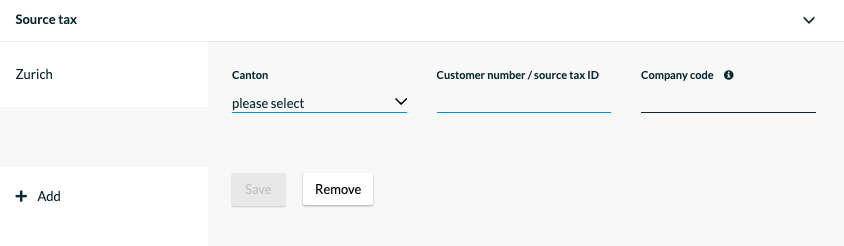
The withholding tax settings can be found in two different places in bexio. On the one hand, in the company under "Master data" → "withholding tax", you enter all cantons that are relevant for your operations and your employees as well as your customer number/QST ID is for the canton in question.
Under the individual employees, you will then find the further settings under "Withholding tax". Go through the entire list and fill in the information that is relevant to your employee.
Meaning of the rate codes
The withholding tax rate codes are specified by the state (tax administration) and always refer to a rate table that you can download from the corresponding cantons. The code is always composed of three digits:
- A – P → The first letter of the code represents the personal circumstances of the employee
- 0 – 5 → The digit stands for the child deductions to be taken into account
- Y – N → The letters Y & N stand for the church tax liability (Y = obligatory, N = not obligatory)
Important: If you are not sure about the code to be used, it is best to contact the Swiss Federal Tax Administration or the cantonal authority directly. Further information on withholding tax can be found under the following link:
❯ FTA – Withholding tax
Calculation in bexio and special cases
bexio carries out the calculations according to the cantonal withholding tax tables. Using your information, we determine which canton the employee has to pay the withholding tax in and then check, using the entered wage, what percentage applies.
In the employee settings under "Withholding tax", you will find the canton applicable to this employee together with the corresponding municipality number. Whenever this field is displayed as empty, you are either missing the municipality number for the employee record or for the company record on the permanent establishment, or the information regarding weekly/daily commuter has not been set.
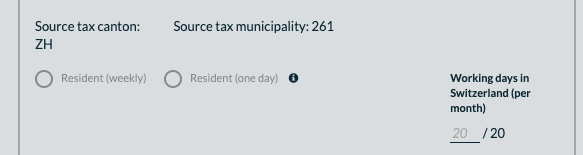
Further down on the right, you will find the "Working days in Switzerland". You can use this setting to define how many days the employee has worked in Switzerland per month and influence the calculation in the payroll accordingly.